
Mesabook 1.0.1 · free and GPL licensed
Restaurant booking plugin for WordPress
Table bookings on your own site, with no commission per booking and without depending on a portal.
Free in full: no paid tier, no crippled features and no monthly booking cap that appears once you already depend on it. GPL licence, complete source inside the package.
· still being updated

The hard part of a restaurant booking plugin is not the form
Anyone can build the form in an afternoon. What decides whether a booking plugin works in a real restaurant is the availability engine: how long a table is held, how long before you can offer it again, how many people can be seated at once, and which tables get pushed together when a party of eight turns up.
That is where almost all of them fail, and it shows on a Saturday at 20:00: two people ask for the last table at the same moment and both get a confirmation. Mesabook holds the slot while the guest fills in their details, with a named lock per restaurant. Tested with eight simultaneous requests for the last table: one booking and seven rejections, which is exactly what has to happen.
Two modes, because not every restaurant is the same
Simple
The default
One screen: when you open, how many people fit, minimum and maximum party size, a daily booking cap and what you charge up front. No rooms, no tables, no floor plans. The word «table» does not appear anywhere.
It is the mode for 80% of restaurants, which do not need a floor plan: they need to know how many people fit at nine.
Detailed
When you need it
Adds areas, individual tables, tables that combine, turnaround buffers, pacing per slot and a different deposit per shift.
Switching mode deletes nothing. You can start in simple and move to detailed when the restaurant asks for it, without setting everything up again.
What it does
Shifts, not «opening hours»
Lunch and dinner on the same day with different rules, and different rules per weekday. A dinner service that runs to 02:00 is an ordinary shift, not a special case to work around.
A calendar for the exceptions
Click a day and close it, or give it its own hours, which override the weekly ones: that is how you open on a bank holiday Monday even though you never open on Mondays. Holidays are one line, not fifteen clicks, and August and Christmas fit together.
Two-step booking
The slot is held while the guest types their details. Without this, two people at 20:00 on a Saturday both walk off with the last table.
Deposits, if you want them
Stripe Checkout, per booking or per cover. The booking is confirmed by the signed webhook, never because the browser came back to your site.
Emails that arrive
Confirmation, approval, cancellation and reminder, in HTML and plain text, with a link to cancel. And it warns you if your WordPress cannot send mail, which is the cause of 90% of «I never get the notifications».
A day sheet and a floor view
The day sheet opens with the two numbers a maître d' wants — bookings and covers — with today, tomorrow and the week one click away. The floor view is tables against hours.
Your time zone, not WordPress's
Each restaurant has its own, so Madrid and the Canaries fit in the same install without drifting an hour.
Several restaurants
From a single WordPress, each with its own shifts, tables and deposits.
What the guest sees and what you see
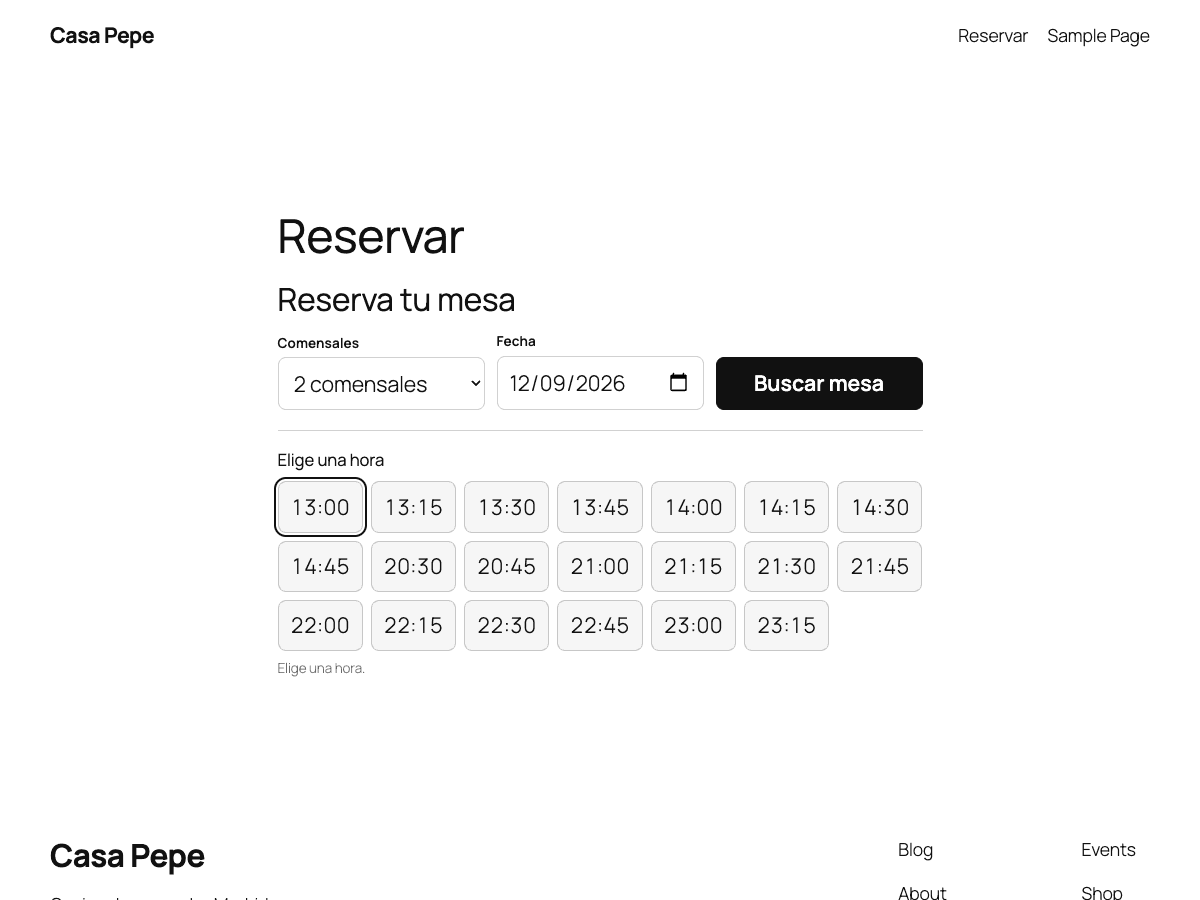
[mesabook].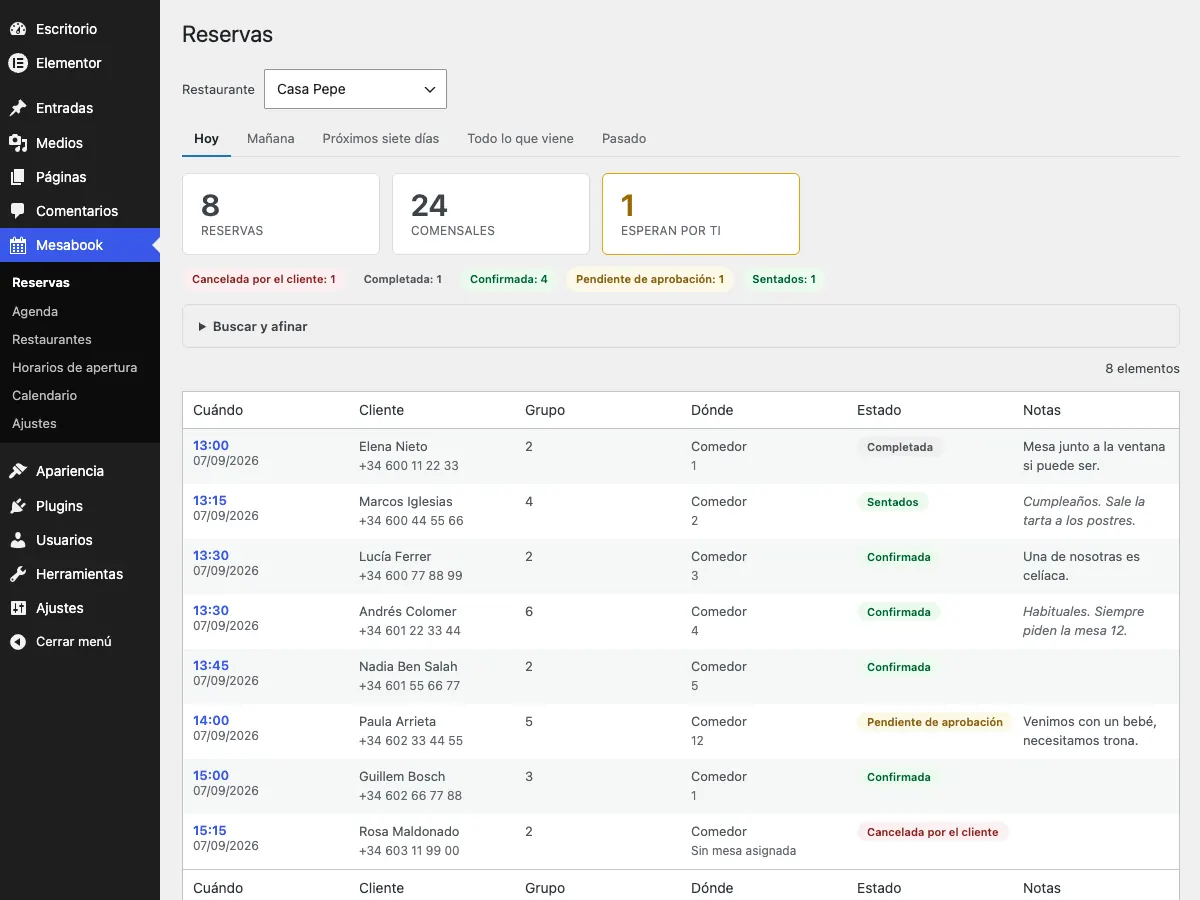
How it is built
This does not usually get told and it should: half the trouble in a WordPress install comes from plugins that do things any old way. A booking plugin gets installed on the site that feeds a restaurant, so it is worth knowing how it is built. These are the decisions we took and why.
- Its own tables, never custom post types. A CPT per booking fills the posts table and slows the whole dashboard down. Bookings live in their own tables, with versioned migrations.
- Never unprepared SQL, never unescaped output. It is the cause of most of the holes published in WordPress plugins.
- No admin-ajax: its own REST API. With a nonce and rate limiting. `admin-ajax.php` loads half of WordPress on every call.
- Dates in UTC, local time only when rendering. It is what stops a clock change moving bookings around.
- No external JavaScript libraries on the front end. Vanilla and `fetch`: 14 KB raw, 4 KB compressed. The form does not add half a megabyte to the restaurant's site.
- No Stripe SDK. Other plugins bundle their own, and two copies of the same library in one WordPress is a fatal error. We talk to the API over HTTP.
- No outbound calls except to Stripe when you configure it. Zero telemetry. The plugin does not phone home.
- Deleting the plugin does not delete your data. Unless you explicitly ask it to.
PHP 8.1 or later · WordPress 6.5 or later, tested up to 7.1 · Spanish and English, with 518 translated strings · GPL-2.0 or later.
How to install it
- 1Download the ZIP. No sign-up and no email needed. It is a direct link.
- 2Upload it to your WordPress. Plugins → Add New → Upload Plugin → choose the ZIP → Install and activate.
- 3Set up the restaurant. Mesabook → Restaurants. Name, time zone and not much else. Simple mode is a single screen.
- 4Place the form. A block in the editor, a widget in Elementor or the [mesabook] shortcode. The panel tells you which pages it is on and offers to create one if it is on none.
A booking that comes through your own site pays no commission
It is the only reason most restaurants end up looking for a booking plugin. The portals do bring tables, and they genuinely do — anyone who says otherwise has never run a restaurant — but each one carries its commission, and it carries it even when the guest already knew you and only used the portal because that was the button in front of them.
That second group is the one you can recover in full: the guest who searches for you by name, the one who comes back, the one arriving from your Google profile or from Instagram. If they land on your site and find a booking button that works, they do not go back to the portal. And if they do not find one, they do.
Look at your last invoice from the portal and separate those two things. What you are being charged for guests who were already yours is exactly what stops being paid the month direct booking works. You do not have to leave the portal to win that.
What Mesabook does not do
It does not bring you new customers. A portal does, and that is why it charges. This is for making sure the people who already reach your site do not end up booking somewhere else, and for stopping the commission on people who came looking for you. They are two different jobs and in almost every case the sensible thing is to have both.
Releases
It is still being updated. What comes out gets listed here, so that «we keep updating it» is something you can check rather than something you have to believe.
1.0.1 ·
Messages you write yourself —the page and the six emails—, three bugs fixed, and the seating times, the closed-days calendar and the style screen that arrive with this version.
- A new messages screen, with an editor per message and a picture button: what the guest reads on the page right under the booking —how to get there, where to park, a photo of the gate— and the six emails (confirmed, awaiting approval, awaiting deposit, cancelled, reminder and your own copy), each with subject, body and the list of variables you can drop in. Anything you leave empty keeps the plugin's own wording, which is translated.
- Fixed: a booking made when it was already too late to cancel online ended up telling the guest that something had gone wrong, about a table that was in fact booked and confirmed by email. It happened in 1.0.0.
- Fixed: the settings screen saved nothing at all.
- Fixed: every email opened with a blank line where the greeting should have been.
- Opening hours per service, lunch and dinner, with the exact times you seat and a maximum number of covers for each one. A time left blank uses the default, and each service has its own days.
- If your site already had opening hours, the screen loads the times you were offering: there is nothing to type again.
- The form now draws its own calendar instead of the browser's, which could not block individual days. Closed days —past dates, the days you never open, holidays and anything outside the booking window— are crossed out and cannot be picked.
- A style screen with a preview that updates as you type: colours, type, corners and width; the wording of the form; surname, phone and notes as hidden, optional or required; and the calendar either behind a button or always visible.
1.0.0 ·
First stable release.
- Availability engine that holds the slot while the guest finishes booking.
- Shifts per day of the week, tables that combine and capacity per area.
- Stripe deposits and several restaurants on a single installation.
- Fully translated into Spanish and English.
Frequently asked questions
Is it really free?
Yes, and without the usual trick of the sector: there is no pro version, no crippled features and no monthly booking limit that appears once the restaurant already depends on the plugin. It is GPL-2.0, the whole source is in the package and you can modify it.
Why are you giving it away?
Because we build websites for restaurants and we needed this for ourselves. Once it was built, charging for it separately adds little, and publishing it adds a lot: it brings us people who have a restaurant and a problem, which is exactly who we want to talk to. If one day you want us to install and configure it for you, that part is paid.
Do I need Stripe?
No. Deposits are optional and the plugin works fully without them. If you turn them on, the booking is only confirmed when Stripe's signed webhook arrives, never because the guest's browser came back to your site: if they close the tab with the payment made, the booking is confirmed anyway.
Does it work if I have two restaurants?
Yes, from a single WordPress, each with its own time zone. That is what lets Madrid and the Canaries live in the same install without the times drifting an hour.
What happens to my bookings if I uninstall the plugin?
They are not deleted. Deleting the plugin leaves the tables intact unless you explicitly tick that you want them removed. Losing a year of booking history because you uninstalled something to test another thing should not happen to anyone.
What state is it in, and will you keep maintaining it?
Version 1.0.1 was released on 23 September 2026 and it is the first stable one: it works, it is tested and we use it on client sites. And yes, we keep updating it. It is not a project we publish and abandon: we need it ourselves for the restaurant websites we build, so every fix and every new feature ends up here. If you find something odd, write to info@zaliza.es.
Which versions of WordPress does it work with?
It requires WordPress 6.5 or later and PHP 8.1 or later, and it is tested up to WordPress 7.1. If your server is below those minimums the plugin will not activate and tells you so with a clear notice, instead of breaking your site with a fatal error.
If what you need is the whole website for your restaurant and not just the booking plugin, we have a page on websites for restaurants with published prices, and we work with restaurants across the Costa del Sol from our office in Málaga.
Download it and try it
No sign-up, no email and no trial that expires. Version 1.0.1 came out on 23 September 2026 and more will follow: we maintain it because we use it on the restaurant websites we build, so every fix ends up here. If something breaks or you are missing a feature, write to us.